
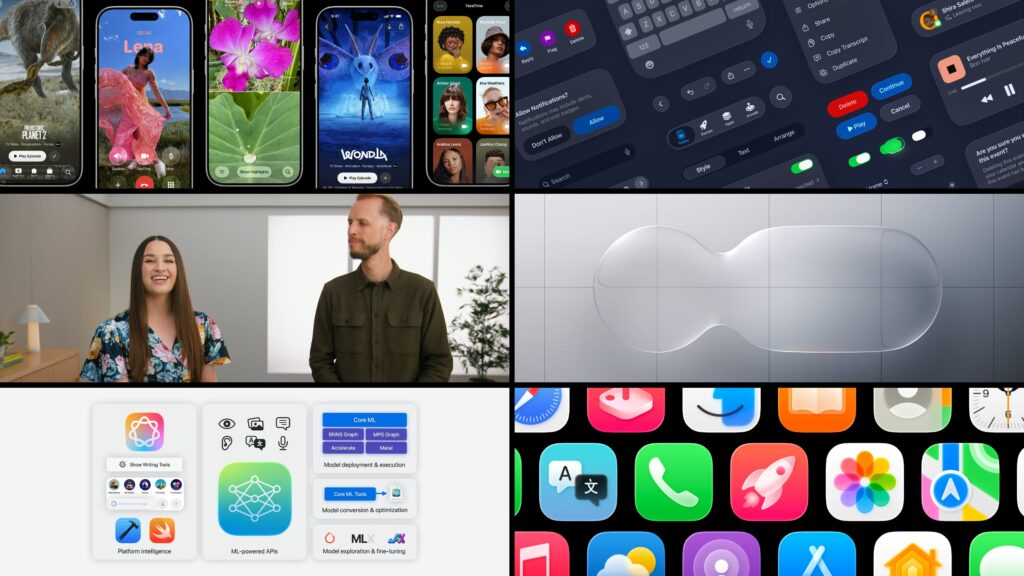
Apple’s Worldwide Developers Conference (WWDC) 2025 has wrapped up, and while last year brought a deeper dive into Apple Intelligence, this year’s focus shifted towards a significant visual overhaul, a streamlined naming convention, and subtle yet impactful enhancements across the entire Apple ecosystem. From a striking new design language to smarter everyday features, here’s a rundown of the key announcements.
The Dawn of “Liquid Glass” and Unified OS Naming
The most striking change unveiled at WWDC 2025 is the new “Liquid Glass” design aesthetic. This represents Apple’s most comprehensive visual transformation since iOS 7, bringing a consistent, translucent, and dynamic look across all its operating systems. Menus, toolbars, and icons now feature a glossy, transparent quality, allowing for a more immersive and aesthetically pleasing user experience. This design philosophy aims to unify the visual language across all Apple devices, from iPhone to Mac, creating a seamless flow as users transition between them.
Accompanying this visual shift is a significant change in how Apple names its operating systems. Gone are the sequential version numbers like iOS 19 or macOS 15. Instead, Apple is adopting a year-based naming convention, aligning all its platforms with the year of their release. This means we’ll see iOS 26, iPadOS 26, macOS Tahoe 26, watchOS 26, tvOS 26, and visionOS 26 rolling out later this year. This simplifies the naming scheme and makes it clearer which version is the most current.
Apple Intelligence: Refinement and Expanded Access
While WWDC 2024 was heavy on the initial unveiling of Apple Intelligence, this year saw a more refined approach to its integration and expanded access for developers. Apple Intelligence continues to power a suite of on-device AI features, and now developers will have direct access to Apple’s on-device large language models through the Foundation Models framework. This opens the door for third-party apps to integrate powerful AI capabilities directly into their experiences.
Key AI enhancements include:
- Visual Intelligence Upgrade: Building on last year’s visual search capabilities, Visual Intelligence can now analyze screenshots and suggest context-aware actions, like adding an event to your calendar. It can also leverage ChatGPT for more complex queries related to images.
- Real-Time Translation: A highly anticipated feature, real-time translation is coming to Messages, FaceTime, and phone calls. This allows for seamless communication across language barriers with both text and audio translation.
- Smarter Shortcuts: Apple Intelligence is being deeply integrated into Shortcuts, making it easier than ever to create complex automations. AI-powered suggestions and the ability to tap into on-device and Private Cloud Compute models unlock a new level of intelligent automation.
- Workout Buddy on Apple Watch: WatchOS 26 introduces “Workout Buddy,” an AI-powered personal trainer that analyzes your workout data and provides personalized coaching and encouragement.
- Enhanced Spotlight: Spotlight is becoming even more powerful with intelligent filtering, quick actions, and context-aware suggestions across Mac and iPhone.
- Genmoji and Image Playground Improvements: Apple’s creative AI tools for generating custom emojis and editing images see further refinements and integration with ChatGPT.
Operating System Deep Dives: New Features and Refinements
Beyond the overarching design and AI updates, each operating system received its share of new features:
- iOS 26: Expect a refreshed Phone app with improved call screening and “Hold Assist,” allowing the system to notify you when you’re off hold. Messages gains new group chat features like polls and customizable backgrounds. The Camera app sees streamlined menus for a cleaner viewfinder.
- iPadOS 26: The iPad gets a significant boost in multitasking capabilities with a new, more intuitive windowing system, allowing for easier resizing, tiling, and management of multiple app windows. The Mac’s Preview app also makes its way to iPadOS.
- macOS Tahoe 26: Alongside the Liquid Glass design, macOS Tahoe introduces a refined Dock and menu bar, customizable folder colors, and Control Center updates. Continuity features are enhanced, bringing iPhone’s Live Activities to the Mac menu bar.
- watchOS 26: In addition to the Workout Buddy, watchOS 26 introduces the “Wrist Flick” gesture for dismissing notifications one-handed and improvements to Smart Stacks.
- visionOS 26: Apple’s spatial computing platform gains “Spatial Scenes,” a new way to create 3D images from your photos, and enhancements to Personas for more realistic digital representations.
- tvOS 26: The Apple TV app gets a redesign with cinematic poster art and improved profile switching. A new Apple Games app also centralizes gaming experiences across Apple devices.
A Continued Focus on Developer Tools
True to WWDC’s roots, Apple also highlighted advancements for developers. Beyond the Foundation Models framework, Xcode 26 will include built-in large language model support to assist with coding, testing, debugging, and documentation, promising a boost in developer productivity.
The Road Ahead
WWDC 2025 painted a picture of a more unified, visually appealing, and intelligently enhanced Apple ecosystem. While some may have hoped for a groundbreaking new hardware announcement, the focus on software refinement and a cohesive user experience across all devices, powered by the evolving Apple Intelligence, sets the stage for the next generation of Apple products. Developer betas for the new operating systems are available now, with public betas arriving in July, and the full releases expected this fall.
